I have always been curious how I could control the parallelism of different flows in Integration Services Packages. But I was not able to find about it earlier. Microsoft gives us enough ability to execute our packages concurrently.
There are a few properties of package (Just right click control flow designer and select Properties).
MaxConcurrentExecutables:
This specifies the maximum number of execution flows allowed in parallel at any point in the package. It specifies the maximum number of threads that a package can create for concurrent execution. Remember that we can not specify 0 (Zero) for this property because this would mean zero thread meaning no execution flow.
The default value is -1. This means 2 more than number of processors.
You might be wondering about scenarios where the number of parallel execution flows might be greater than the number of threads specified. In all such cases, the remaining threads would have to wait until the time any thread completes execution.
EngineThreads:
This property is used to incorporate parallelism into data flow tasks. It has a default value 10. Be careful in specify the value. This is because this property, along with MaxConcurrentExecutables, decides the number of parallel execution flows in a package simultaneously.
Additionally two properties of Dataflow tasks can be used to specify Temporary storage to any faster disks. These properties are BLOBTempStoragePath and BufferTemppStoragePath.
Showing posts with label SSIS. Show all posts
Showing posts with label SSIS. Show all posts
Friday, October 17, 2008


Monday, September 29, 2008
SSIS Package Deployment Utility
For deploying packages created by business analysis developers in SQL Server Integration Services, Business Intelligent development studio introduces Package Deployment Utility. This deployment utility can create a deployment package by means of which you can deploy your package in:
1. File System
2. SQL Server job
Just take properties of your project and go to Deployment Utility tab.
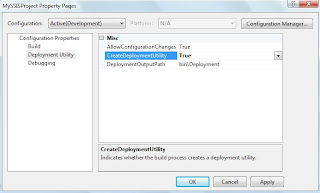
Set the "Create Deployment Utility" as "True" and specify the "Deployment Path".
As soon as you build your project deployment utility is created in the above specified folder with the package file. The file type of Deployment Utility is "Integration Services Deployment Manifest". The extension of the deployment package is "*.SSISDeploymentManifest".
When you run this manifest file. The package deployment wizard is started which helps in deploying the package.
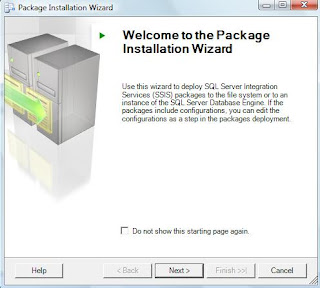
As discussed above, you can also specify the deployment destination for our SSIS package.
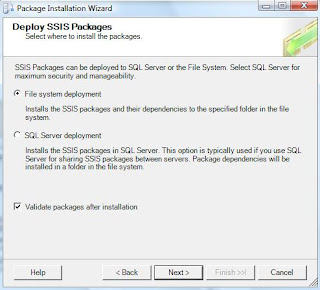
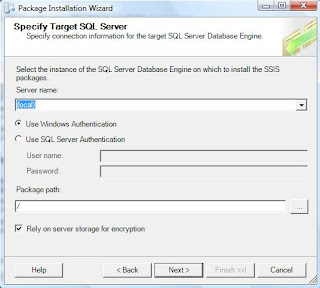
If you choose to install in the file system then you just have to specify the destination folder and start the wizard. If you choose otherwise and install in the SQL Server instance, then you have to specify the SQL Server instance in which we want to install this package.
1. File System
2. SQL Server job
Just take properties of your project and go to Deployment Utility tab.

Set the "Create Deployment Utility" as "True" and specify the "Deployment Path".
As soon as you build your project deployment utility is created in the above specified folder with the package file. The file type of Deployment Utility is "Integration Services Deployment Manifest". The extension of the deployment package is "*.SSISDeploymentManifest".
When you run this manifest file. The package deployment wizard is started which helps in deploying the package.

As discussed above, you can also specify the deployment destination for our SSIS package.

If you choose to install in the file system then you just have to specify the destination folder and start the wizard. If you choose otherwise and install in the SQL Server instance, then you have to specify the SQL Server instance in which we want to install this package.

Wednesday, September 24, 2008
SSIS Unit Testing Framework
Hi guyz,
I have always been displeased being not able to unit test my packages
created in SSIS. This was because there was no way to do this.
But the days of darkness are gone. SQL Server Integration Services
Community has felt this need of the day and has come up with a Unit Testing
Framework. Now guyz! if you are not from development background even then
you don't need to worry because no .net code has to be written to write
your unit tests. All you have to create is an XML files with your commands.
So you don't need to know any .net code. Still I have not found out if I
want to write some .net code then how can I do that.
The thing I liked most is that this Unit Test framework is based on xUnit.
It means it follows the same setUP, test. and tearDown flow. There is also
support for Test Suites. The developers of Microsoft Dynamics AX should be
happy to listen to this news.
To keep ease in consideratino, a GUI has been added to create Unit Tests.
I am copying a sample XML used for this framework from codeplex.
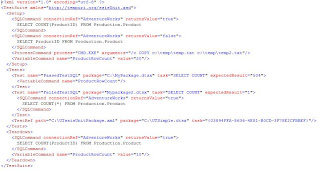
You can download it from the following codeplex.com link:
SSIS Unit Testing Framework
You can see that it is just version 1.0 release in Aug, 2008. So
don't expect it to be all bug free.
You would be glad to know that the utility is available as .
So I can't wait to put my hands on this. Share your experience with me
about this.
Enjoy!
I have always been displeased being not able to unit test my packages
created in SSIS. This was because there was no way to do this.
But the days of darkness are gone. SQL Server Integration Services
Community has felt this need of the day and has come up with a Unit Testing
Framework. Now guyz! if you are not from development background even then
you don't need to worry because no .net code has to be written to write
your unit tests. All you have to create is an XML files with your commands.
So you don't need to know any .net code. Still I have not found out if I
want to write some .net code then how can I do that.
The thing I liked most is that this Unit Test framework is based on xUnit.
It means it follows the same setUP, test. and tearDown flow. There is also
support for Test Suites. The developers of Microsoft Dynamics AX should be
happy to listen to this news.
To keep ease in consideratino, a GUI has been added to create Unit Tests.
I am copying a sample XML used for this framework from codeplex.

You can download it from the following codeplex.com link:
SSIS Unit Testing Framework
You can see that it is just version 1.0 release in Aug, 2008. So
don't expect it to be all bug free.
You would be glad to know that the utility is available as .
So I can't wait to put my hands on this. Share your experience with me
about this.
Enjoy!
Wednesday, July 9, 2008
SSIS Utilities (DTSWizard, DTUtil)
Today I stumbled across two very good utilities shipped with SQL Server
2005. They are both SSIS based.
1. DTSWizard:
This is a wizard based import export utility. This creates a SSIS package,
executes it, copy it to file system or to database instance. This SSIS
package is for import / export data from many sources to SQL Server. I used
it to create a package to export data to excel file, which is successfully
did. I loved this utility.
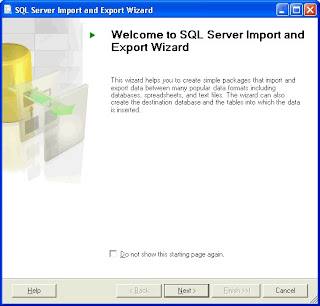
You can start this utility by just typing DTSWIZARD in the command prompt.
2. DTUTIL:
This is also related to SSIS. This is about copying / moving SSIS packages
from / to SQL Server.
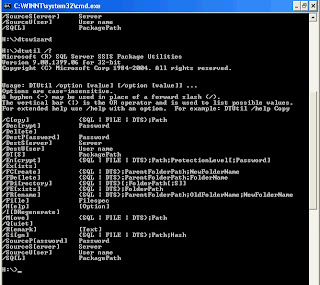
You can start this utility by typing DTUTIL from SQL Server. This is not
wizard based but it uses or creates SSIS package.
2005. They are both SSIS based.
1. DTSWizard:
This is a wizard based import export utility. This creates a SSIS package,
executes it, copy it to file system or to database instance. This SSIS
package is for import / export data from many sources to SQL Server. I used
it to create a package to export data to excel file, which is successfully
did. I loved this utility.
You can start this utility by just typing DTSWIZARD in the command prompt.
2. DTUTIL:
This is also related to SSIS. This is about copying / moving SSIS packages
from / to SQL Server.
You can start this utility by typing DTUTIL from SQL Server. This is not
wizard based but it uses or creates SSIS package.
Subscribe to:
Posts (Atom)


